
Free • No account needed

Online Protrack 2 Log Viewer

Upload your L&B Protrack 2 log file and instantly see your jump data as a clear graph showing altitude and vertical speed. You'll also get a full breakdown of key metrics like exit altitude, deployment altitude, freefall time, and maximum speed.

Altitude & Speed Key Metrics Share & Compare

Works with L&B Protrack II log files. Just plug your altimeter in via USB, upload the .txt file, and start analyzing.

Upload your log
No file selected
Drag & drop your .txt log
or click anywhere to browse

What you get from a single upload

All of this, instantly, from your Protrack 2 .txt file.
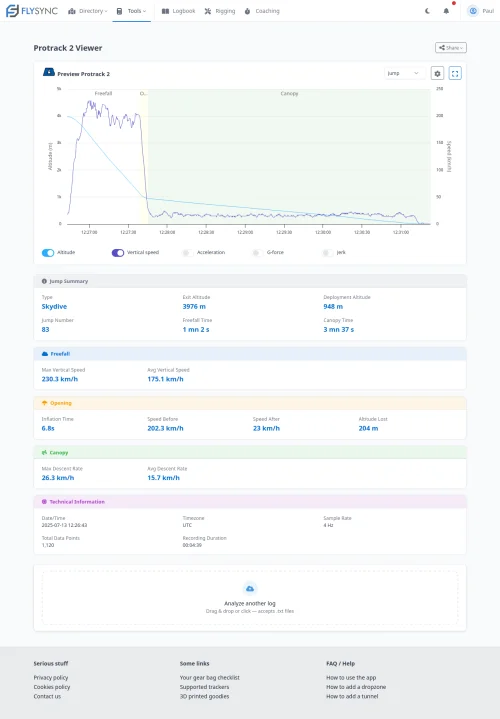
Protrack 2 log viewer preview

Altitude Profile

Full altitude vs. time graph with automatic phase detection for freefall and canopy.

Speed Analysis

Vertical speed chart showing your profile through every phase of the jump.

Key Numbers

Exit altitude, deployment altitude, freefall time, max speed, time under canopy and more.

Speed Scoring

Automatic speed skydiving metrics: average speed through the competition window.

Share & Compare

Get a unique link to share your log with anyone, no account needed to view.

Logbook Ready

Sign up for free to save your Protrack logs and build your digital logbook automatically.

Protrack 2 log viewer preview

Frequently Asked Questions

The L&B Protrack 2 is an audible altimeter commonly used by skydivers to monitor their altitude during freefall and canopy flight. It records jump data that can be analyzed later using log viewers like this one.

To view Protrack 2 logs online, simply upload your .txt log file using the upload form above. The system will process the file and display your jump data in an easy-to-read graph format.

No account or software installation is required. Just upload your Protrack 2 log file and view your jump data instantly.

Yes, the Protrack 2 log viewer is designed to work on both desktop and mobile devices. You can upload your log file from your phone or tablet and view your jump data on the go.

You can view altitude and vertical speed graphs, as well as key metrics such as jump number, exit and deployment altitude, time in freefall and under canopy, ... which all help you analyze your jump performance or fill in your logbook.

Yes, the Protrack 2 log viewer is completely free to use. You can upload and view as many logs as you like without any cost or subscription.

Protrack 2 logs are typically saved in a plain text (.txt) format, which contains barometric pressure and time data recorded during your jump, our tool allows you to easily read that data for free.

This viewer is specifically designed for Protrack 2 logs. For other altimeters, please check our "Tools" menu if there are dedicated viewers available.

No, Because L&B removed the USB port on their Protrack 3, we can't currently extract jumps from the altimeter without using their app; We're working on it though!.

Want to keep all your jumps in one place?

FlySync is a free logbook that stores your Protrack data alongside all your other altimeters, tracks your gear, and gives you even more analytics.