
Free • No account needed

Online GPX Viewer

Drop in your GPX log file to see your flight path on a map, along with altitude, vertical speed, and horizontal speed graphs. Works with any GPX file from GPS loggers, action cameras, or phone apps.

GPS Map Speed & Altitude Flight Path

GPX is a universal format supported by most GPS devices. Upload your file and instantly see altitude, speed, and your track on a map.

On the full platform you will be able to store these results straight into your logbook.

Upload your GPX file
No file selected
Drag & drop your .gpx file
or click anywhere to browse

What you get from a single upload

All of this, instantly, from your .gpx file.
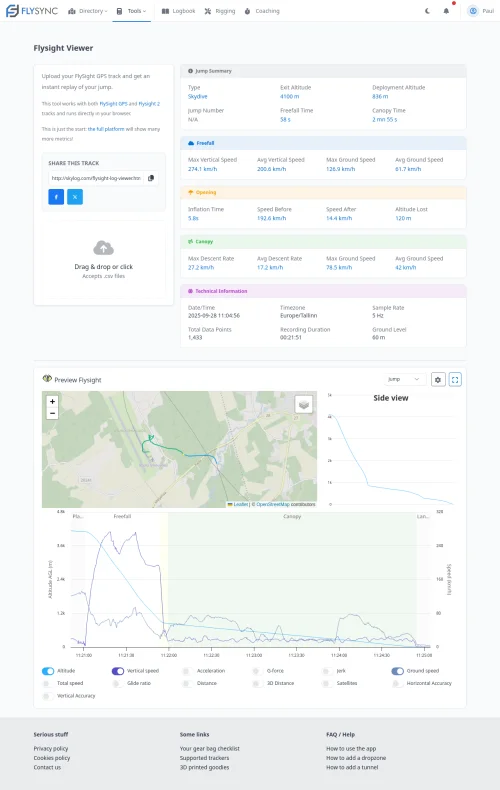
GPX log viewer preview

Interactive Map

See your GPS track plotted on a map with markers for key points along the route.

Altitude Profile

Full altitude vs. time graph showing your elevation changes throughout the activity.

Speed Analysis

Vertical and horizontal speed charts to analyze your performance at every moment.

Side View

A unique side-on profile view of your route showing elevation changes along the path.

Share & Compare

Get a unique link to share your track with anyone, no account needed to view.

Universal Format

GPX files work with most GPS devices, action cameras, and phone apps, all supported here.

GPX log viewer preview

Frequently Asked Questions

GPX (GPS Exchange Format) is a universal XML-based format for storing GPS data, tracks, waypoints, and routes. It's supported by almost every GPS device, action camera, and phone app.

Most GPS loggers, Garmin devices, action cameras (GoPro with GPS), phone tracking apps, and many sports watches can export GPX files. If your device records GPS data, chances are it supports GPX.

Make sure you're uploading a valid GPX file. Some devices export in slightly different formats, some of which do not include time data. If that is the case, we can not show the track on the map or provide speed graphs, but you should still see the altitude profile.

You'll see your track on an interactive map, plus altitude and speed graphs. The side view shows your elevation profile along the route.

Yes, the GPX viewer is completely free to use. Upload as many files as you want, no account needed.

Absolutely. While we have dedicated viewers for specific altimeters like FlySight and Protrack, the GPX viewer handles any GPS data, including from skydiving devices that export to GPX.

Yes, the viewer is fully responsive and works on phones and tablets. Just upload your GPX file and explore your track.

Yes. After uploading, you'll get a unique shareable link that anyone can open to view your track, no account needed on their end.

Want to keep all your jumps in one place?

FlySync is a free logbook for skydivers that stores your GPS tracks alongside all your other altimeter data, tracks your gear, and gives you even more analytics.